18,422 files. You’ve watched maybe 400. SiftVid is a local-first video library for Windows 10 and 11 — one payment, no account, no server, no way for me to see your files.
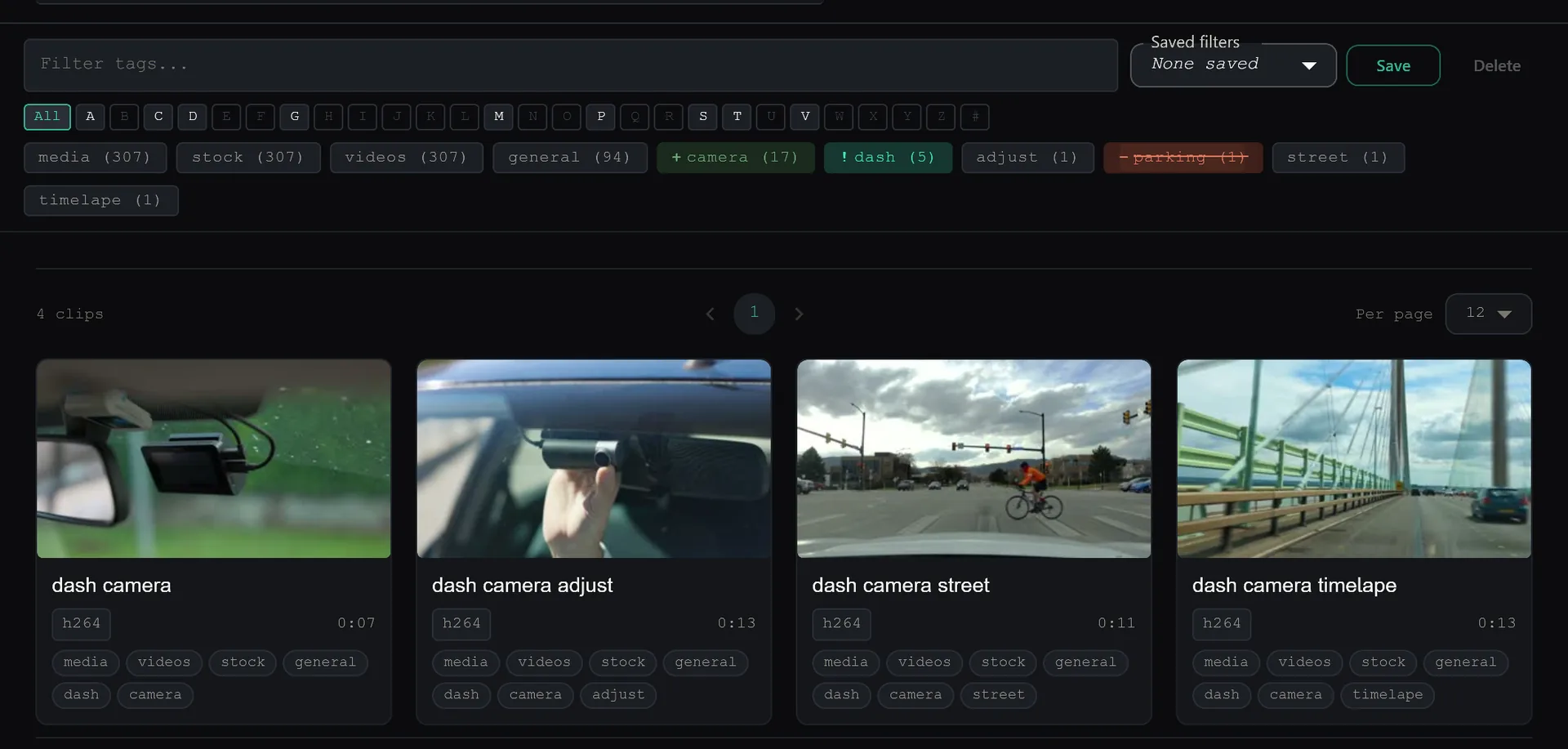
One chip. Four states. AND, OR, NOT — in a single row.
Every tag in your library is a chip with four states. Click to include, click again to require, click again to exclude, click once more to clear. The query include outdoor, require ceremony, exclude cutaway takes three clicks. No advanced-search modal, no boolean syntax to memorise.
- Four-state chips. Off · Include · Require · Exclude. The colour tells you which state every tag is in at a glance.
- Auto-tagged on import. Filenames, folder paths, and sidecar metadata become tags automatically. No manual labelling.
- Six dropdown filters. Category, Location, Region, Time, Folder, People — each composable with the chip filter.
- Fuzzy search on top. Type “batroom”, get bathrooms. uFuzzy backend with codec and location synonyms baked in.
Clip-Level Organization. Not just file-level.
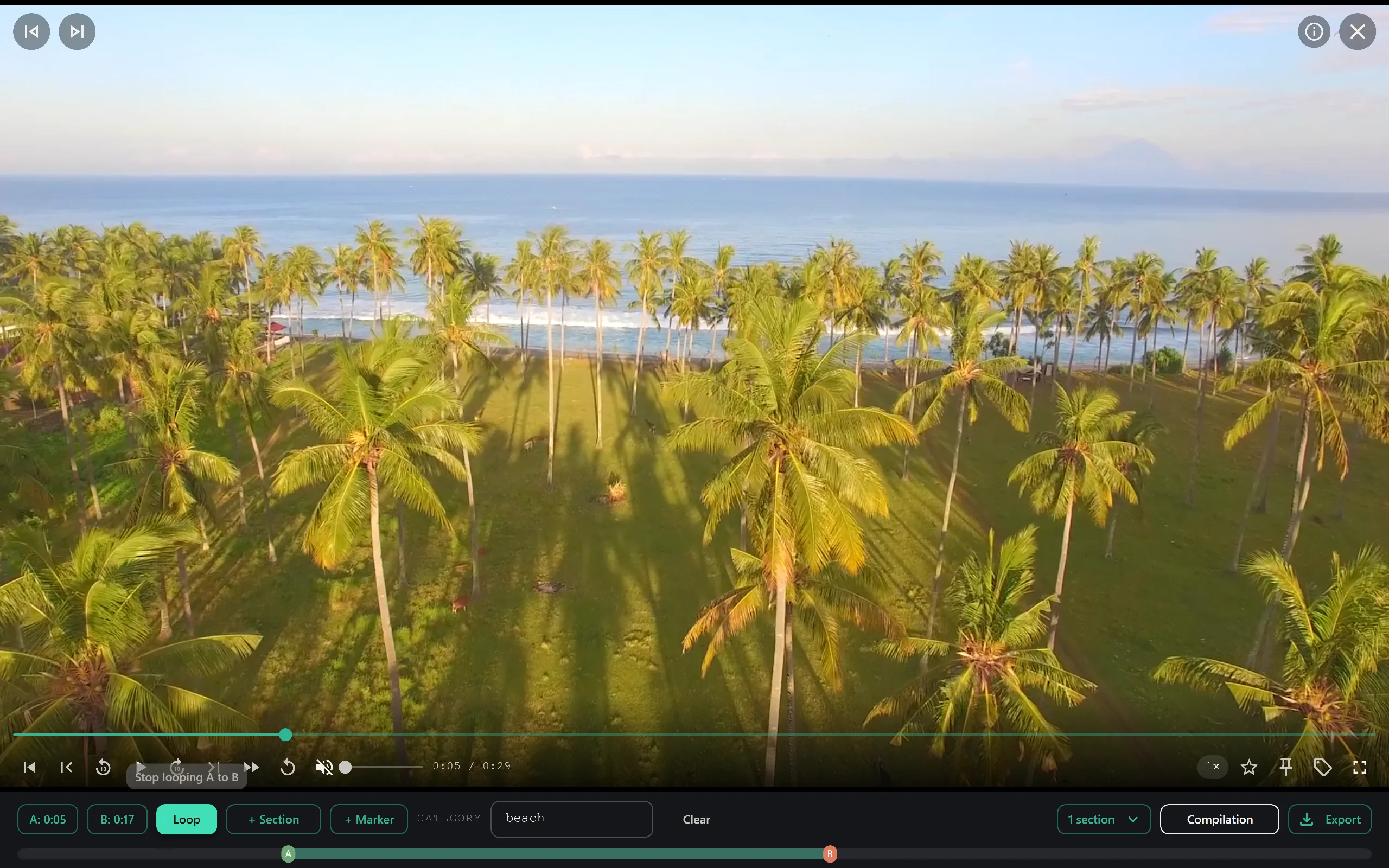
Stop cutting up your source files just to organize them. Mark precise A–B video sections and assign multiple category tags to a single moment without duplicating files on your hard drive.
- A–B section loop. Custom Video.js control with three visible states: idle, point-A set, looping. Loop any segment indefinitely.
- Multi-tag sections. Assign multiple category tags to a single clip segment. One moment can belong to every category it deserves.
- Correct and refine. The AI learns from your feedback. Rejecting a false match automatically injects hard-negatives back into the model, making it smarter every time you use it.
- Theater mode & hover preview. Distraction-free playback; hover any thumbnail to see what’s inside before you click.
Offline-first privacy
Your library never leaves your machine.
SiftVid requires no account and no phone-home connectivity. Manual search, playback, and editing make zero network calls; turning on auto-classification needs a one-time model download, and nothing you scan is ever uploaded.
- No account required. No sign-up, no login, no email verification. Install and start indexing immediately.
- Zero network calls for search or playback. File scanning, dictionary parsing, and database indexing happen locally on your own CPU and GPU. Auto-classification needs a one-time model download first; after that, it also runs with no network calls.
- Works offline. After the first scan, the whole library works without a network. Indexed once, cached forever.
- Native file access. Reads directly from any folder on your PC. No browser permission prompts, no cloud upload, no syncing.
Nobody decides to lose track of their own footage.
If your folder structure stopped working three years ago, this is for you. If it still works, you don’t need me — and I would rather say so than sell you something.
Folders still worked
A few hundred clips. You named the important ones, dropped the rest in a folder by month, and you could still picture what was in each one. Nothing here needed fixing.
“I know exactly where that is.”The first to-sort folder
The naming slipped. One folder became a holding pen for anything you would deal with later. You still find things, but you scroll first, and you have started to guess.
“It’s in one of these. Probably.”Scrolling instead of watching
Thousands of files across two drives. You know the clip exists because you remember shooting it. Forty minutes later you close the window and put on something you have already seen.
“I gave up and rewatched the same thing again.”You own things you cannot reach
The drive is fine. Nothing is corrupted, nothing is lost, and there is no error message. You simply cannot get to most of what you own. That is the whole problem, and it is the one I built for.
“A file I can’t find is a file I don’t own.”What SiftVid isn’t.
We get asked about this often enough that it’s worth saying out loud. SiftVid is software for organising your own files. It is not, and will never be:
- A public host. There is no public link for any clip you upload. Ever.
- A file-sharing service. You can't send clips to other users from inside the app.
- A marketplace. You can't sell, list, or monetise anything stored in SiftVid.
- A creator-payout platform. No tips, no fan payments, no payouts of any kind.
- A piracy tool. You are responsible for owning what you organise. We terminate accounts that don't.
- A vertical-specific product. SiftVid doesn't care what the footage is — it cares about format, size, and findability.
Honest answers.
Does any data get sent to the cloud?
Absolutely zero. SiftVid is entirely offline-first. Model training, file scanning, dictionary parsing, and database indexing happen locally on your own CPU and GPU.
What are the minimum hardware requirements?
SiftVid includes an internal hardware auto-detect routine on launch to scale itself to your machine. It utilizes standard multi-core processing or local DirectML-compatible graphics cards to accelerate video hover previews and AI tasks.
What video formats are supported?
Thanks to an integrated universal FFmpeg layer, SiftVid handles standard video libraries easily, performing automated codec rescues and transcode mapping for heavy or older camera formats.
Is SiftVid a subscription?
No. SiftVid is a one-time purchase. Pay once, own it forever. All feature enhancements and bug fixes within the major version lifecycle are included completely free. There are no recurring fees of any kind.
Can I share my clips with someone else?
No. There is no public-link feature, no shared folders, no "invite a friend" to your library. SiftVid is single-user software.
How many videos can it really handle?
There is no cap on library size. Two-tier caching (memory and IndexedDB) means a fresh load takes seconds, not minutes, and repeat loads are effectively instant however large the library gets.
How is this different from Plex or Jellyfin?
Plex and Jellyfin are streaming servers built to share content from a home server to a TV. SiftVid is a single-user library and review tool built for the person doing the editing, culling, or coaching. We do not do public sharing, we do not do server-to-client streaming for guests, and we focus on review-grade playback (A-B loop, speed cycling) instead of living-room playback. See our Acceptable Use Policy for what’s prohibited.
Pay Once. Own Forever.
SiftVid is built on a classical desktop software model. A single upfront payment unlocks unlimited library indexing and all features. No subscription, no recurring fees, no hidden costs. All feature enhancements and bug fixes within the major version lifecycle are included completely free.
WINDOWS DESKTOP APP · ONE-TIME PURCHASE · NO CLOUD · NO SUBSCRIPTION · NO ACCOUNT REQUIRED
Get told when it gets better
SiftVid is a one-time purchase that keeps getting updates. Leave an email and we will tell you what changed.